Apple and Amazon’s integrated monetization features allow you to earn revenue directly from the music and audio content purchased from listening on your Live365 station. By connecting your Amazon Associates or Apple Services Performance Partner accounts to your Live365 Dashboard, your listener-facing players will automatically embed customized purchase links. When listeners buy tracks, albums, or services using those links, you earn a direct commission!
NOTE: While the Amazon Associations Program is open to anyone, the Apple Performance Partner Program is restricted to Enterprise users, which requires users to have content already published in the Apple Store to be eligible.
- Adding your Affiliate Codes to the Live365 Dashboard
- Amazon Associates Program Setup
- Apple Services Performance Partner Program Setup
Adding your Affiliate Codes to the Live365 Dashboard
If you are already enrolled in Apple and Amazon’s affiliate programs, activating your codes on your station takes less than 60 seconds.
NOTE: If you have not enrolled in Apple or Amazon’s affiliate program, please see Apple Services Performance Partner Program Setup or Amazon Associates Program Setup.
- Log into your Live365 Dashboard.
- From the left-hand navigation menu, navigate to Station Profile to locate the Affiliate Links subsection at the bottom of the page.
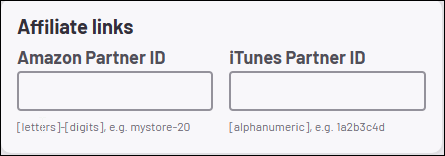
- Add your tracking credentials into their designated fields
- Amazon Partner ID
- iTunes Partner ID
- Click the orange Save Settings button at the bottom right corner of the Live365 Dashboard.
Amazon Associates Program Setup
The Amazon Associates program allows you to earn commissions on qualifying digital music purchases and other retail items.
Eligibility Requirements:
- An active Live365 station with a public-facing profile or personal website/social channel used to promote it.
- You must drive at least 3 qualified sales within the first 180 days of signing up to maintain your account active and pass final human review.
- You must display a legally compliant affiliate disclosure on your station profile or website identifying yourself as an Amazon Associate.
Sign-Up Steps:
- Navigate to the Amazon Associates Central homepage and click Sign Up.
- Log in with your existing Amazon account, or create a new business account.
- Account Information: Enter your primary information (name, address, phone number).
- Website and Mobile App List:Input your Live365 station profile URL as the platform where you will display links.
- NOTE: If you have a Branded Single Station App, you can also add your Mobile App link here.
- Profile Setup: Choose your preferred Associate ID(a unique tracking nickname).
- Describe what your station/website focuses on and choose the relevant topic categories (e.g., Music, Audio, Entertainment).
- Select Content/Niche Website as your website type.
- Traffic & Monetization: Explain how you drive traffic to your station (e.g., SEO, Social Networks, Email Lists).
- Complete the identity verification and add your Tax and Payment (Direct Deposit) details.
- Once finalized, copy your unique Associate ID/Tracking ID (typically ends in -20).
NOTE: All commission earnings and payouts are handled by Amazon directly.
NOTE: Commission income is paid approximately 60 days after the end of the month in which it was earned.
Apple Services Performance Partner Program Setup
The Apple Performance Partner Program allows you to earn commissions on Apple Music subscriptions, digital song downloads, albums, and more.
Eligibility Requirements:
- Enrollment in the Apple Performance Partner Program is restricted to Enterprise users, which requires users to have content already published in the Apple Store to be eligible.
- Applications must include a fully functioning, public website, or active social platform – sites under construction or without clear privacy policies will be automatically rejected.
NOTE: Apple’s program is highly curated and specifically reviews applications for quality and volume.
Sign-Up Steps:
- Visit the Apple Services Performance Partners platform.
- Click Apply Now to open the Partnerize application portal (the third-party network powering Apple’s affiliate framework).
- Select your entity type (Record Label or Artist, Movie or TV studio, Book Author or Publisher) and complete the registration form with your digital property details.
- NOTE: Select Content Website for Company Category/Vertical
- After submission, Apple will manually review your station or website for compatibility guidelines.
- Account Activation: Once accepted, you will receive an automated email containing a unique sign-up link. Follow it to create your account credentials on the Apple Partnerize interface.
- Log in to your new Partnerize dashboard and locate your unique Affiliate Token from your account settings menu.
NOTE: All commission earnings and payouts are handled by Apple directly.
NOTE: After you start generating sales and have hit the minimum payment threshold of $30 USD or equivalent for your chosen currency, your commission payment will be available approximately 60-90 days after the month’s end.
