The total ad time on your station depends on your package type. For With Ads packages, the standard requirement is 4 minutes of ads per hour (56 minutes of content to 4 minutes of ads).
Advertisements help offset the cost of your Live365 broadcaster subscription. Through our Advertising Revenue Share Program, revenue earned from listener ad impressions is credited directly back to your Live365 account.
How Ads Work by Package Type
- With Ads Packages: Broadcasters receive a lower subscription rate in exchange for maintaining the required 4 minutes of advertising per hour as outlined in the Advertising Revenue Share Program terms.
- Ad Control Packages: Broadcasters have the freedom to choose if, when, and how often ads play on their stream. You can opt to run no ads at all, or enable Live365 ads at any time via Streaming → Advertisements in your Dashboard. Opting out of network ads means paying the standard full-price subscription rate.
Ad-to-Music Ratios
Whether you are on a With Ads plan or choose to enable ads on an Ad Control plan, you can regulate how those 4 minutes are distributed across each hour:
- 28 mins Music & 2 min ads (2 ad breaks per hour)
- 14 mins Music & 1 min ads (4 ad breaks per hour)
- 7 mins Music & 30 sec ads (8 ad breaks per hour)
Manual Playlists vs. AutoDJ: If you broadcast live or use manual playlists instead of AutoDJ, you must manually insert ad break triggers into your curated tracks. Learn how to build playlists and insert ad triggers here.
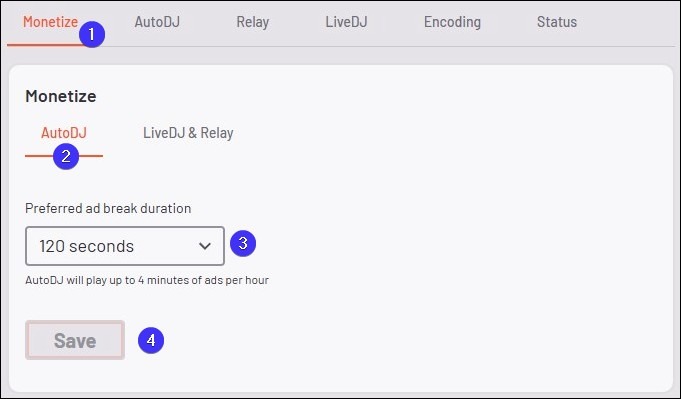
How to Set Ad Frequency in AutoDJ
- From the Station Menu, click Streaming, then select AutoDJ.
- On the right side of the Monetize screen, select the AutoDJ tab.
- Click the Preferred Ad Break Duration drop-down menu to make a selection.
- Select your preferred ad break duration (e.g., 30 sec, 1 min, or 2 min).
- Click Save to record the changes.
If you have any questions, comments, or concerns regarding advertisements or setting up your station, please contact our Support team here.